
MCP Evidence Pack Template | 0xClaw
Use this MCP evidence pack template to collect traceable proof, map trust boundaries, and hand auditors evidence they can verify.
Use this MCP evidence pack template to collect traceable proof, map trust boundaries, and hand auditors evidence they can verify.
- MCP Evidence Pack Template | 0xClaw should explain infrastructure choices in a way that is easy to quote, compare, and operationalize.
- Tie architecture explanations back to how local execution, governance, and evidence handling work in practice.
- Use official docs plus product pages so the page can rank for definitions and support AI citation.
Quick answer: what belongs in an audit-ready AI pentest evidence pack for MCP servers?
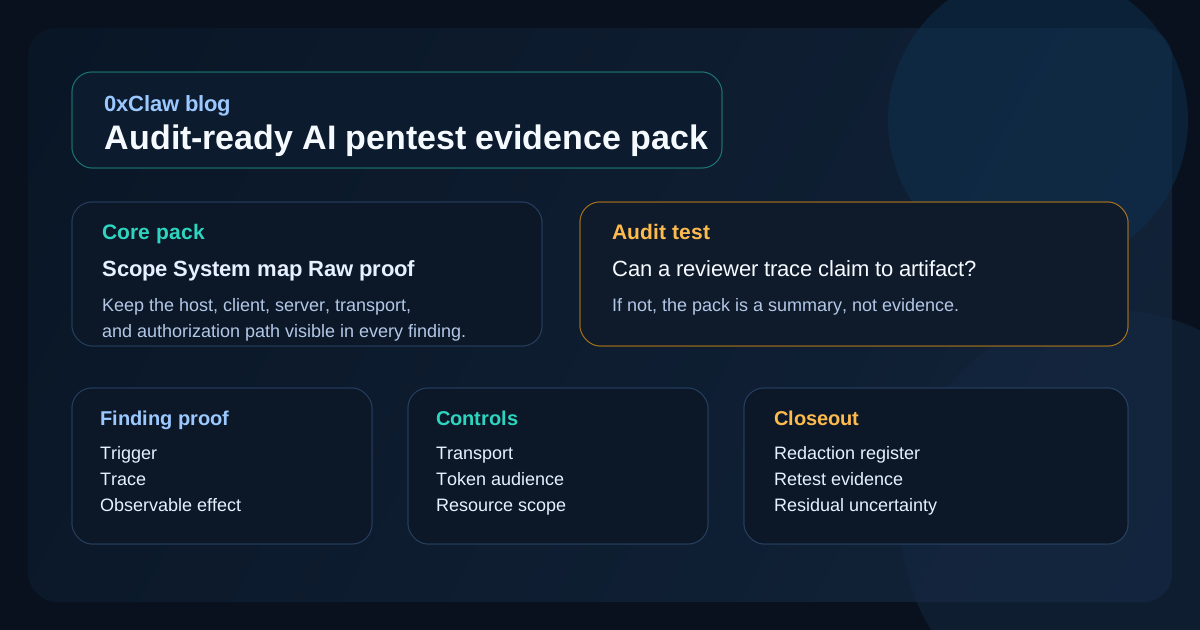
An audit-ready AI pentest evidence pack for MCP servers should include five things: the exact scope that was authorized, a clear map of the MCP trust boundary that was tested, raw proof for every confirmed finding, redaction notes that explain what was removed and why, and a retest section that shows whether the fix actually closed the path. If any of those pieces is missing, the pack may still work as an internal note, but it is not strong enough for audit, vendor review, or customer due diligence.
That difference matters. A report tells people what you think happened. An evidence pack shows what happened, where it happened, and why the conclusion is justified. With MCP servers, that usually means preserving the host-client-server split, the transport in use, the authorization path, and the exact tool or resource interaction that crossed a boundary. If you are comparing tooling before you settle on your workflow, start with compare. If you need the wider library of security writing and templates first, the blog hub is the faster place to browse.
A report is not the same thing as an evidence pack
Teams mix these up all the time. A pentest report is the narrative layer: scope, summary, findings, remediation, business impact. An evidence pack is the proof bundle that sits underneath that narrative. Auditors, customer security reviewers, and skeptical engineering leads often care more about the second one than the first, because the second one answers a harder question: "Can I trace this claim back to something real?"
That distinction becomes sharper with MCP servers. The MCP architecture is explicitly host-client-server. The host manages permissions and lifecycle. The client runs the session. The server exposes tools, resources, prompts, and sometimes upstream integrations. When a finding appears, the pack has to show which layer failed. Otherwise you end up with a vague sentence like "the AI integration leaked data," which is almost useless when the actual issue sat in host consent, metadata discovery, token handling, or an overpowered tool implementation.
The OWASP Web Security Testing Guide reporting section still applies here. Findings should be understandable, actionable, and backed by enough detail for technical staff to reproduce or challenge them. What changes in MCP work is the shape of the proof. You are not just collecting screenshots of a web screen. You are often collecting session context, JSON-RPC traces, HTTP exchanges, capability negotiation details, and the visible effect of a tool call or resource fetch.
Why MCP evidence needs tighter boundaries than a normal web-app pentest
MCP gives you more moving parts, which means more chances to lose the thread. The authorization spec says HTTP-based transports should follow the authorization flow, while stdio transports should not. The same document requires protected resource metadata for authorization server discovery. The security best practices page goes further and calls out confused deputy risks, token passthrough, session hijacking, and SSRF.
That has two practical consequences for evidence collection.
First, you need to preserve the exact transport and auth mode. A bug observed over Streamable HTTP with OAuth-backed access control is not the same as a local stdio session that pulled credentials from the environment. Engineers cannot retest accurately if the pack blurs those together.
Second, you need to record the boundary that failed, not just the symptom. If the client fetched attacker-controlled metadata and reached an internal address, the evidence pack should say whether the unsafe behavior happened during discovery, redirect handling, or follow-up fetch logic. If a server accepted an upstream-issued token without validating audience, the pack should show the token context, the request path, and the resulting access, not just a generic note that "authorization was weak."
This is why I would rather see one lean, precise evidence bundle than a polished twenty-page report padded with screenshots. Audit readiness is not about volume. It is about traceability.
The minimum structure of an audit-ready evidence pack
You do not need a giant binder. You need a structure that survives review. I recommend seven sections, in this order:
| Section | What it answers | Typical artifacts |
|---|---|---|
| Engagement snapshot | What was authorized and tested? | Scope note, date, tester, target version, environment |
| MCP system map | Where are the trust boundaries? | One diagram or one table covering host, client, server, transport, auth, upstreams |
| Test log index | What evidence exists? | Artifact list with IDs, timestamps, and file names |
| Findings proof | What is confirmed? | Message traces, requests, responses, screenshots, observed effects |
| Redaction register | What was removed? | Secret masking notes, privacy exclusions, legal constraints |
| Retest evidence | Did the fix work? | Before/after traces, blocked path, new status code or denial state |
| Residual uncertainty | What is still unconfirmed? | Leads, assumptions, test limits, blocked actions |
That order is not arbitrary. It follows the logic behind NIST SP 800-115: plan the test, conduct it, analyze the findings, and develop mitigation guidance. An evidence pack should make that sequence visible. Reviewers should be able to start at authorization and scope, move into proof, and end on retest without hunting across Slack threads or copied terminal dumps.
If your team is trying to standardize how this bundle gets produced across different products, it is worth checking how your tooling behaves under real pressure. A local workflow usually gives you better control over raw traces and redaction discipline. If that tradeoff matters, download and test the flow yourself.
What to capture for every confirmed MCP finding
This is the heart of the pack. Every confirmed finding should have the same evidence spine so that reviewers do not have to decode a new reporting style each time.
Use this checklist:
- Trigger The exact prompt, tool call, crafted input, request sequence, or user action that started the behavior.
- Session context Host product, server name, version, transport, negotiated capability, auth state, and any upstream identity in play.
- Raw protocol proof JSON-RPC messages, HTTP requests, headers, status codes, server responses, or logs with secrets redacted.
- Observable effect The thing that actually happened: unauthorized data access, internal fetch, file read, policy bypass, state change, or privileged action.
- Boundary crossed The layer that failed: host consent, metadata discovery, token audience validation, resource scoping, upstream API trust, or tool validation.
- Repro notes The shortest honest path for another engineer to replay the issue.
- Confidence Confirmed, partial, or needs retest, with one sentence explaining the label.
The confidence field is not there to sound scientific. It is there because AI-assisted testing can generate plausible theories faster than it generates proof. That is useful during exploration, but it is dangerous in a final pack. If the trace proves the bad outcome, call it confirmed. If you only proved the risky condition and not the full exploit chain, say so plainly.
Here are a few examples of what "good enough" looks like in practice:
- For token passthrough, include the inbound token context, the missing or failed audience check, the forwarded request, and the downstream action that succeeded.
- For SSRF, include the attacker-controlled URL, the client or server fetch step, the internal destination reached, and whether response data came back or the request only proved network reachability.
- For a local tool overreach, include the declared tool purpose, the crafted arguments, the path or resource actually touched, and the data exposed or action performed.
Without that spine, you are asking the reviewer to trust your summary. That is exactly what an evidence pack is supposed to avoid.
A practical template you can copy today
Below is a stripped-down template that works well for internal reviews, procurement diligence, and customer-facing security follow-up. It is deliberately plain. Fancy formatting does not help much here.
# engagement snapshot

- engagement name:
- date tested:
- tester:
- target MCP server:
- server version / commit / package:
- host application:
- environment:
- transport:
- authorization model:
- capabilities in scope:
- upstream systems reachable:
- out-of-scope actions:
- data handling rules:

# MCP system map

- host:
- client/session layer:
- server:
- auth server or credential source:
- local resources exposed:
- remote resources exposed:
- critical trust boundaries:

# artifact index

| artifact id | timestamp | type | description |
| --- | --- | --- | --- |

# finding MCP-01

- title:
- severity:
- confidence:
- affected layer:
- preconditions:

## trigger

## session context

## raw proof

## observable effect

## impact

## remediation owner

## retest condition

# redaction register

| artifact id | redaction applied | reason |
| --- | --- | --- |

# residual uncertainty

- leads not confirmed:
- blocked paths:
- assumptions:
You can keep this attached to a full report or use it as the appendix beneath one. If you already publish broader guidance for buyers or internal stakeholders, link back to your core product and documentation pages from the narrative layer, not the artifact bundle. The artifact bundle should stay narrow and defensible.
The three mistakes that make evidence packs fail review
1. Treating logs as self-explanatory
They are not. A raw transcript can be valuable, but it still needs context. What server version was this? Which capability was negotiated? Was the session authenticated? Which step in the flow matters? An evidence pack should not make the reviewer reverse-engineer the entire incident from timestamps alone.
2. Redacting so aggressively that the proof collapses
Redaction is necessary. Sloppy redaction is not. If you blank out hostnames, path fragments, tool names, response headers, and timestamps, you may protect secrets but destroy the audit value. The fix is a redaction register. Say exactly what was removed and why, while leaving enough structure behind to preserve meaning.
3. Mixing confirmed findings with interesting leads
This is the easiest trap in AI-assisted pentesting. The model sees a pattern and proposes a likely issue. That can be a great starting point. It is not yet evidence. Keep unconfirmed leads in a separate section. Otherwise the whole pack starts to read like speculation with screenshots attached.
If you are buying tooling rather than building your own workflow, this is one of the fastest ways to separate solid products from flashy demos. Look at the sample artifact output, not just the dashboard. That is where pricing conversations usually get real.
How to make the pack useful for auditors, not just engineers
Engineers and auditors read the same packet differently. Engineers want repro steps and repair targets. Auditors want evidence of control operation, scope boundaries, and clear handling of exceptions. A good evidence pack serves both without turning into compliance theater.
For auditors, add four small touches:
- A scope statement that names the exact server, environment, and date window.
- A control note beside each finding that says what security expectation was violated.
- A redaction register that explains privacy or legal removals.
- A retest section that shows whether the broken path is now blocked.
This is also where MCP-specific provenance can help. The MCP Registry explains that the registry focuses on namespace authentication and metadata hosting, while broader code scanning is delegated elsewhere. That means provenance and runtime safety are related, but not interchangeable. An audit-ready pack should not imply that a registry entry itself proves secure implementation. If a reviewer asks where the server came from, record the package, registry or repo source, and version in the engagement snapshot.
The cleaner your evidence pack is, the less time you spend in the follow-up meeting explaining what a screenshot "really meant."
How to review the pack before you send it
Before you publish or share the pack, run a quick QA pass. I use five questions:
- Can a reviewer tell exactly what was in scope without contacting the tester?
- Does every confirmed finding include raw proof and an observable effect?
- Does every artifact preserve the MCP layer where the issue occurred?
- Are redactions documented instead of silently hiding context?
- Does the retest section show a blocked path, not just a claim that the issue was fixed?
If any answer is no, the pack needs another pass.
This is also a good point to check whether the evidence is still readable outside your internal environment. Relative file names, private screenshot links, and copied snippets from ephemeral logs are common failure points. A reviewer should not need your local terminal history to understand the proof.
FAQ
Do I need a separate evidence pack if I already have a pentest report?
Usually yes. A report summarizes. An evidence pack substantiates. In a lightweight internal workflow they can live in the same document, but the evidence still needs its own structure.
What is the most important MCP-specific detail to preserve?
The trust boundary that failed. In practice that usually means host consent, transport choice, capability scope, metadata discovery behavior, or token validation.
Should I include full raw logs?
Only when they help. Include the portions that prove the finding and retain an artifact index for the full set. Dumping everything into an appendix without context is noisy and hard to review.
How should I handle secrets and personal data in screenshots or traces?
Redact them, then record the redaction in a small register. The point is to protect sensitive data without weakening the chain of proof.
Is an MCP Registry listing enough evidence that a server is trustworthy?
No. The registry is useful for provenance and metadata, but it is not the same thing as a runtime security assessment or code review.
What makes a retest section credible?
It should replay the original path closely enough to prove the fix closed it. "Patched and verified" is not evidence. A blocked request, denied tool call, or new rejection trace is.
Closing note
The best evidence pack is the one that survives skepticism. It does not ask the reader to trust the tool, the tester, or the summary paragraph. It shows the scope, the boundary, the proof, and the retest in a way that can be checked. For MCP servers, that discipline matters more than usual because the architecture itself spreads responsibility across host, client, server, and upstream systems. When the pack preserves those boundaries, the review gets faster and the fixes land in the right place.
Ready to run your first AI pentest?
Get 0xClaw up and running in under 3 minutes. No infrastructure setup. No cloud dependency.
More AI Pentest Guides
Continue through the local AI pentesting cluster with related guides on workflow, evidence, comparisons, and remediation.
Best AI penetration testing tools 2026
Compare 0xClaw, NodeZero, PentestGPT, Promptfoo, and garak by execution layer. Chat advice is not authorized target testing.
Read next ->AI Pentest CLI Explained | 0xClaw
Learn what an AI pentest CLI is, how local AI penetration testing works, and how to evaluate a safe, authorized workflow.
Read next ->Run a Local AI Pentest Workflow | 0xClaw
Learn how to run a local AI pentest workflow from scope to report across authorized web, API, host, and network testing.
Read next ->