
MCP Pentest Alternatives Checklist | 0xClaw
Use this checklist to compare MCP pentesting alternatives across auth, prompt injection, evidence quality, protocol coverage, and workflow.
Use this checklist to compare MCP pentesting alternatives across auth, prompt injection, evidence quality, protocol coverage, and workflow.
- MCP Pentest Alternatives Checklist | 0xClaw should explain infrastructure choices in a way that is easy to quote, compare, and operationalize.
- Tie architecture explanations back to how local execution, governance, and evidence handling work in practice.
- Use official docs plus product pages so the page can rank for definitions and support AI citation.
Quick answer: how to evaluate AI pentesting alternatives for MCP servers
Most "alternatives" to an AI pentesting workflow for MCP servers fall into one of four buckets: prompt evaluation tools, protocol inspection tools, classic appsec tooling, or internal scripts. None of those categories is automatically wrong. The problem is that teams often compare them as if they test the same thing. They do not.
If you are evaluating an alternative, ask a narrower question: can this stack verify MCP-specific risks such as prompt injection through tool metadata, OAuth mistakes, token scope confusion, unsafe local server execution, and evidence preservation after a tool call? If the answer is fuzzy, the tool is probably not ready for production sign-off. If you want the surrounding category map first, browse the main blog or jump to the compare hub. If you already know you need a local workflow, go straight to download.
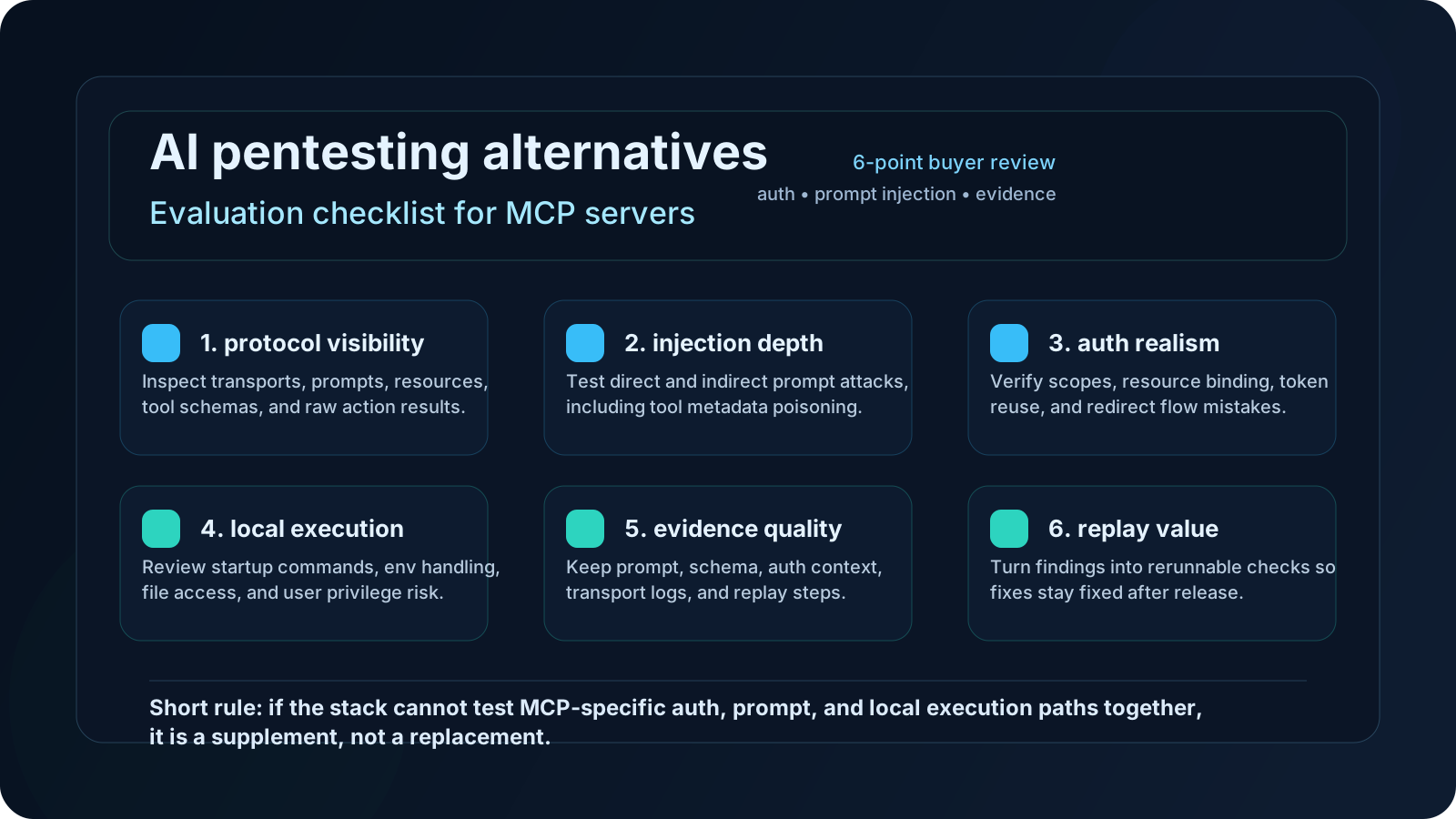
The one-page checklist below summarizes the review standard I would use with a serious security team.
Why teams keep looking for alternatives
MCP adoption moved fast. Anthropic introduced MCP in November 2024 as an open standard for connecting AI systems to outside tools and data, and by December 9, 2025, Anthropic said MCP had spread across major platforms and thousands of public servers through the new community-driven ecosystem. That speed is useful for builders and awkward for defenders. Security buyers now have to review tool chains that were stitched together before many orgs even had a stable agent policy.
That is why this search term exists. Teams are not always shopping for "the best AI pentest tool." Sometimes they want the cheapest acceptable path, the lightest stack that still gives honest coverage, or a way to reuse tools they already own. In practice, I usually see one of these motives:
- a platform team wants to reuse prompt evaluation tooling
- an appsec team wants to extend DAST, SAST, or OAuth review habits into MCP
- an infra team trusts internal scripts more than a new vendor
- a buyer is trying to prove that manual review is still enough
Those are all reasonable starting points. They become dangerous when the evaluation ignores the structure of MCP itself. The official MCP security guidance does not describe a generic chatbot problem. It calls out token passthrough, confused deputy risk, OAuth discovery abuse, session hijacking, local server compromise, and untrusted tool metadata. That is a broader attack surface than "can the model be tricked by a bad prompt?"
What actually counts as an alternative
Before scoring anything, classify it. I would not let a review continue until every candidate is placed in one bucket.
| Alternative type | What it does well | What it usually misses |
|---|---|---|
| Prompt evaluation tools | Replays attack prompts, measures unsafe model behavior, runs regression suites | Weak protocol visibility, thin auth analysis, limited action-layer evidence |
| MCP inspection tools | Shows transports, prompts, resources, tool schemas, and raw calls | Often not a true adversarial harness |
| Classic appsec tooling | Finds standard web flaws, auth bugs, input validation issues, SSRF, injection | Usually blind to model planning and prompt-level abuse |
| Internal scripts | Precise for your environment, fast to customize, cheap to run | Hard to maintain, easy to overfit, usually poor for reporting |
That classification step sounds basic, but it prevents half the nonsense in security tooling reviews. A protocol inspector is not a red-team harness. A DAST scanner is not a prompt injection framework. A few shell scripts are not a durable evidence pipeline. Once you say that out loud, the comparison gets more honest.
For MCP servers, I would only call something a credible alternative if it covers at least two layers at the same time:
- the AI layer, where prompts, tool descriptions, and tool outputs can manipulate model behavior
- the application layer, where authorization, network access, resource handling, and local execution can turn that behavior into damage
If a candidate only touches one layer, it can still be useful. I just would not accept it as the whole answer.
The MCP-specific checklist that matters
This is the heart of the evaluation. If I were reviewing alternatives for an internal buy, I would score each candidate against the checklist below and reject anything that cannot produce evidence for each line item.
1. Prompt injection coverage
The tool should test more than hostile user chat. OWASP's LLM Top 10 keeps prompt injection near the top for good reason, but MCP changes where that injection can land. You need coverage for:
- poisoned tool names and descriptions
- malicious resource content
- prompt template abuse through attacker-controlled arguments
- indirect injection from remote documents, tickets, or web pages
If the product demo only shows "tell the assistant to ignore previous instructions," that is not enough.
2. Authorization realism
MCP's authorization model is not optional dressing. The MCP authorization spec requires OAuth-based controls and explicitly says clients must use Resource Indicators when requesting tokens. RFC 9700 gives the broader OAuth security baseline behind that expectation. The question for an alternative is simple: can it verify the real auth path, or does it hand-wave it away?
Look for tests around:
- over-broad scopes
- token reuse across servers
- missing audience or resource binding
- unsafe credential storage
- failures in the consent or redirect flow
If the vendor says "we integrate with OAuth" but cannot show resource-bound token tests, I would mark that down immediately.
3. Confused deputy and token passthrough defenses
This is one of the places where MCP-specific guidance gets very concrete. The official security best practices warn against token passthrough and spend time on confused deputy problems. An evaluation alternative has to do more than mention those terms. It should show whether one server can coerce a client into misusing tokens or calling another service with the wrong authority boundary.
That means the review must answer:
- can one tool call trigger access outside its intended resource boundary?
- can a remote MCP server influence OAuth metadata discovery or related fetches?
- can the client be tricked into forwarding credentials it should never forward?
If the alternative cannot exercise those cases, it is too shallow for sign-off.
4. Local server execution risk
A lot of MCP usage is local. That changes the blast radius. The official guidance is blunt here too: local MCP servers can execute with the user's privileges, access local files, and expose risk before a remote network control ever matters. An evaluation stack needs to inspect install paths, startup commands, environment handling, file permissions, and what happens when a local server is malicious, outdated, or just sloppy.
This is where classic web tooling alone falls apart. You need evidence from the workstation side, not just HTTP traces.
5. Evidence quality
Security reviews die on bad evidence. If the alternative finds an issue but cannot preserve the triggering prompt, the tool metadata, the request context, the raw response, and the resulting user-visible action, you will fight about severity for days.
Ask whether the tool can retain:
- exact attack input
- tool schema or metadata snapshot
- auth context
- network or transport transcript
- final action result
- replay instructions for regression
I care about this almost as much as detection quality. A finding you cannot reproduce is a meeting, not a result.
6. Regression value
Some tools are good at discovery and bad at keeping fixes fixed. The alternative should produce artifacts that can be rerun after a remediation change. That might be a config file, a test case, or a structured replay. If a candidate only supports manual clicking and screenshot collection, it will not age well.
A practical scorecard for buyers
I like simple scorecards because they force decisions. Score each category from 0 to 5. A stack that averages below 3 is probably a supplement, not a replacement.
| Category | What a 5 looks like | What a 1 looks like |
|---|---|---|
| MCP protocol visibility | Shows transports, schemas, prompts, resources, and raw actions | Only shows final chat output |
| Prompt injection depth | Tests direct and indirect injection paths with MCP-specific carriers | Only tests generic jailbreak prompts |
| Authorization coverage | Exercises real OAuth flows, resource binding, and scope abuse | Treats auth as setup, not a test target |
| Local execution review | Inspects startup commands, env exposure, and local privilege risk | Assumes all MCP risk is remote |
| Evidence and replay | Produces reproducible logs and rerunnable cases | Leaves you with screenshots and notes |
| Operator workflow | Fast enough for regular use, clear enough for security review | Heavy, fragile, or too bespoke to share |
I would also add one business question that buyers skip too often: who is supposed to run this every month? A stack that only one staff engineer can operate is not cheap. It just hides its cost in meetings and delay. If you need help framing that tradeoff against product packaging, the pricing page is useful after the technical shortlist is clear.
Red flags that should end the evaluation fast
Some issues are disqualifiers. I would stop the review if I saw any of these.
"We test agents, so MCP support is implied"
No. MCP adds its own protocol and auth patterns. General agent coverage is not proof of MCP coverage.
"We can scan the endpoint, so we cover the server"
Also no. Endpoint scanning might catch a conventional web flaw. It tells you almost nothing about poisoned tool descriptions, unsafe prompt templates, or local server launch behavior.
"We found one prompt injection, so the category is covered"
One exploit demo is not a checklist. You need breadth across direct injection, indirect injection, auth abuse, and evidence capture.
"Manual review is enough because the server list is small"
Small lists grow. More importantly, manual review tends to skip replay and drift detection. If you choose manual review, make that tradeoff explicit instead of pretending it scales.
"The registry entry is verified, so the server is safe"
The registry helps with provenance. It does not certify that the code is secure. Anthropic's December 9, 2025 update about the MCP ecosystem and the official registry materials make that distinction pretty clear. Authentic origin and safe behavior are two different questions.
When a lighter alternative is enough
Not every team needs the heaviest workflow on day one. I would accept a lighter alternative in a few cases.
First, the server is internal-only, narrow in scope, and exposes low-risk read operations. Second, the organization already has mature OAuth review, host hardening, and change control around local tooling. Third, the team can show a repeatable prompt injection harness plus protocol inspection, even if that stack comes from two smaller tools instead of one bigger platform.
In that situation, a mixed stack can be enough. For example:
- one tool for prompt and tool-metadata attacks
- one tool for MCP inspection and raw call review
- one conventional control for auth, SSRF, or local execution hardening
That can work. I would still document the gaps. Maybe the team has no durable regression suite. Maybe local install review is manual. Maybe indirect injection coverage is weak. Fine. Write it down and own it.
This is where internal links matter too. If your team is still sorting out the broader tool category, the compare hub is the faster route. If you want more MCP-specific context, the blog has supporting pieces on prompt injection testing and report structure.
When you probably need a dedicated AI pentest workflow
I would stop trying to cobble together alternatives when any of these are true:
- your MCP servers can write, delete, purchase, deploy, or otherwise take action
- you depend on remote community servers you do not fully control
- local MCP servers run on developer laptops with sensitive credentials nearby
- you need evidence that stands up in security review, procurement, or compliance work
- the fix loop keeps breaking because findings are not reproducible
At that point, you are not looking for a cute tool stack. You are looking for operational discipline. A dedicated workflow is usually worth it because it preserves context across planning, execution, evidence capture, and remediation. That continuity is hard to fake with three disconnected point tools.
There is also a human factor here. Security teams do better when the workflow makes the right thing the easy thing. If every review starts from scratch, coverage drifts. If evidence is manual, people cut corners. If auth review sits in a different tool from prompt review, ownership gets muddy. That is usually the real reason teams upgrade.
FAQ
Can classic DAST replace MCP security testing?
No. DAST can still be useful for standard web issues around the surrounding service, but it does not meaningfully cover prompt injection through tool metadata, model planning failures, or local MCP execution risk on its own.
Is prompt injection testing alone enough for an MCP server?
No. Prompt injection testing is necessary, but MCP evaluations also need authorization review, token boundary checks, local execution review, and evidence capture that preserves the actual tool call path.
Are internal scripts a bad option?
Not automatically. Internal scripts can be a good supplement, especially for narrow local checks. They become risky when teams confuse "we can script one case" with "we have a repeatable evaluation program."
What is the fastest honest evaluation path?
Use one tool to pressure-test prompts and tool metadata, one tool to inspect the MCP protocol surface, and one explicit review track for OAuth and local execution boundaries. If that stack starts feeling fragile, you have your answer.
Bottom line
The best way to evaluate AI pentesting alternatives for MCP servers is to stop treating them like interchangeable boxes. Score them against the MCP threat model, not the marketing category. If a candidate cannot test prompt injection beyond chat text, cannot verify OAuth boundaries, cannot inspect local execution risk, or cannot preserve replayable evidence, it is a partial tool. That may still be useful. It is just not a replacement.
If I were buying today, I would rather run a smaller but honest checklist than sign off on a broad claim with thin proof. Start with the checklist, keep the scope explicit, and only call an alternative "enough" after it survives MCP-specific review.
Ready to run your first AI pentest?
Get 0xClaw up and running in under 3 minutes. No infrastructure setup. No cloud dependency.
More AI Pentest Guides
Continue through the local AI pentesting cluster with related guides on workflow, evidence, comparisons, and remediation.
Best AI penetration testing tools 2026
Compare 0xClaw, NodeZero, PentestGPT, Promptfoo, and garak by execution layer. Chat advice is not authorized target testing.
Read next ->AI Pentest CLI Explained | 0xClaw
Learn what an AI pentest CLI is, how local AI penetration testing works, and how to evaluate a safe, authorized workflow.
Read next ->Run a Local AI Pentest Workflow | 0xClaw
Learn how to run a local AI pentest workflow from scope to report across authorized web, API, host, and network testing.
Read next ->