
MCP Pentest Report Template | 0xClaw
Use this MCP pentest report template to document scope, transport, auth, evidence, findings, remediation, and retest results.
Use this MCP pentest report template to document scope, transport, auth, evidence, findings, remediation, and retest results.
- MCP Pentest Report Template | 0xClaw should explain infrastructure choices in a way that is easy to quote, compare, and operationalize.
- Tie architecture explanations back to how local execution, governance, and evidence handling work in practice.
- Use official docs plus product pages so the page can rank for definitions and support AI citation.
Quick answer: what should an AI pentest report for an MCP server include?
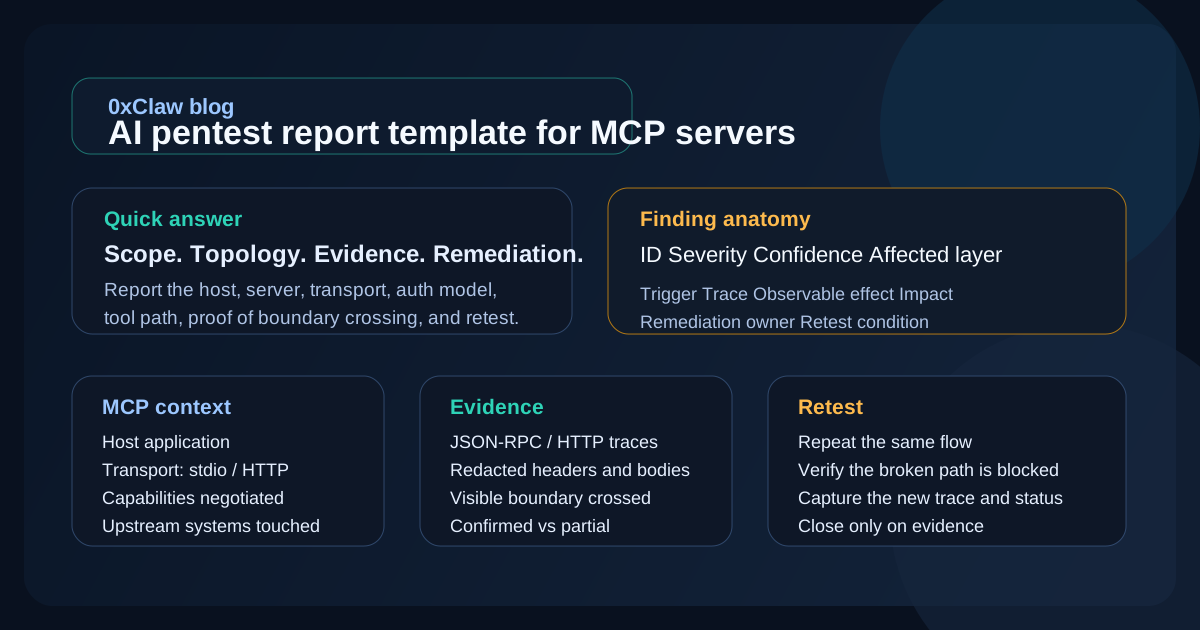
An AI pentest report template for MCP servers should document the engagement scope, the MCP topology, the transport and authorization model, the exact tool or resource tested, the evidence that proves the finding, the business and technical impact, the remediation path, and the retest condition. That sounds obvious until you read a weak report. Then it is usually just a transcript, a severity label, and a lot of implied trust.
For MCP work, the report has to do one extra job. It has to explain where the risk lived: in the host, the client session, the server, the upstream API, or the way those pieces were stitched together. The official MCP architecture is explicitly host-client-server, with capability negotiation and isolated server connections, so your report has to preserve those boundaries instead of flattening everything into "the AI app was vulnerable." If you are comparing tooling before you settle on a reporting workflow, start at compare. If you want the broader knowledge base first, the full blog hub is the faster route.
Why MCP server reporting needs a different template
An MCP pentest report template is not just a generic web-app report with "MCP" dropped into the title. MCP servers are part of a session-based protocol. The host manages connections and user consent, each client keeps a stateful connection to one server, and servers expose resources, tools, and prompts through declared capabilities. That means a finding can sit in a few different places:
- the host's permission or consent flow
- the server's tool implementation
- the transport boundary, such as
stdioor Streamable HTTP - the authorization flow between client, server, and upstream APIs
- the handoff between MCP metadata and downstream infrastructure
That distinction matters because the official MCP security guidance calls out specific failure modes that do not look like ordinary route-level bugs: confused deputy issues in OAuth proxy patterns, token passthrough, SSRF during metadata discovery, session hijacking, and local MCP server compromise. If your report does not say which layer failed, engineering loses time and the fix often lands in the wrong place.
This is where many "AI pentest report template" articles go soft. They talk about professionalism, screenshots, and executive summaries. Fine. But an MCP server pentest report is only useful if it preserves trust boundaries. When a server fetches third-party data, forwards tokens upstream, or exposes a powerful local tool, the report needs to show exactly how that happened and what permission model allowed it.
Start every report with an MCP engagement snapshot
Before the first finding, add a short engagement snapshot. Not a page of ceremony. Just enough information so another engineer can reconstruct what was authorized and what was actually tested. NIST SP 800-115 frames testing as planning, conducting, analyzing findings, and developing mitigation strategies. That sequence still applies here. If the planning context is missing, the rest of the report gets shaky fast.
For MCP work, the snapshot should include:
| Field | What to record | Why it matters |
|---|---|---|
| Target server | Server name, version, repo or package source | Confirms which implementation was tested |
| Host application | The host product and version | Host controls permissions, session lifecycle, and user consent |
| Protocol revision | The MCP revision or negotiated feature set observed during the session | Version-sensitive behavior is easier to retest later |
| Transport | stdio, Streamable HTTP, or custom transport | Changes the attack surface and evidence you need |
| Authorization model | None, OAuth-based MCP auth, API key wrapper, or custom scheme | Tells reviewers where tokens and trust boundaries live |
| Server capabilities | Tools, resources, prompts, sampling, subscriptions | Limits what should have been reachable in scope |
| Upstream dependencies | APIs, databases, file system access, cloud metadata exposure | Shows what a successful exploit could actually touch |
| Test constraints | Read-only rules, blocked actions, time box, data handling rules | Prevents later confusion about why some paths were not executed |
If the server came from a public catalog, include its namespace or publication source too. The official MCP Registry says it uses namespace authentication to tie server names to verified GitHub accounts or domains, but it also says code scanning is delegated to package registries and downstream aggregators. That is useful reporting context. Provenance and code safety are related, but they are not the same thing.
Map the MCP system before you write findings
OWASP reporting guidance is clear that findings need enough detail for engineers to act. With MCP servers, that usually means inserting a small architecture section before the findings list. Keep it short. One diagram, one table, or one concise narrative is enough.
At minimum, capture:
- Which host created the session.
- Which MCP server the client connected to.
- Which capabilities were negotiated during initialization.
- Which upstream services or local resources the server could reach.
- Where authentication happened and where authorization decisions were enforced.
That architecture note saves a surprising amount of pain later. Suppose a finding shows that a malicious server can force the client to fetch attacker-controlled metadata and then probe an internal address. The report should not say only "SSRF observed." It should say whether the unsafe fetch happened during protected resource metadata discovery, whether the client followed redirects, whether internal IP ranges were reachable, and whether the response content made it back to the attacker or only to the local user.
The same applies to token issues. The official MCP authorization guidance stresses that access tokens must be issued for the MCP server itself and that generic token passthrough is forbidden. If your test found that the server accepted a token intended for some upstream API, the report should name the audience mismatch, the request that proved it, the downstream action it enabled, and the control that should have rejected it. "Auth bug" is not enough.
What evidence belongs in each MCP finding
This is the part most teams under-specify. A finding should not just say what the tester believes. It should include the raw proof that lets someone else agree or disagree. OWASP's reporting structure calls for a reference ID, impact, exploitability, detailed description, remediation detail, and supporting resources. For MCP server pentest reporting, I would add one more field that matters a lot in AI-assisted workflows: confidence.
For each finding, capture these evidence blocks:
| Evidence block | What good looks like |
|---|---|
| Trigger | The exact user action, tool invocation, prompt, or crafted request that started the behavior |
| Session context | Host, server, transport, negotiated capability, and auth state at the time of the finding |
| Request/response proof | JSON-RPC messages, HTTP requests, headers, tool arguments, or response bodies with secrets redacted |
| Observable effect | File read, network request, metadata fetch, privilege change, data disclosure, or policy bypass that actually happened |
| Boundary crossed | Which trust boundary failed: host consent, server validation, audience check, metadata fetch policy, local resource scope, or upstream API boundary |
| Confidence | Confirmed, likely, partial, or needs retest, with one sentence explaining why |
The confidence line is not a standards requirement. It is just practical. AI pentest evidence for MCP servers often includes model-generated reasoning mixed with real protocol traces. A clean confidence label keeps you from presenting a plausible chain as a confirmed exploit when one step still needs manual validation.
The short rule I use is simple:
- If the exploit changed state, read protected data, or crossed a boundary in a repeatable way, call it confirmed.
- If the evidence shows the dangerous condition but not the final step, call it partial.
- If the model suggested the issue but the trace does not prove it, keep it as a lead, not a finding.
A working AI pentest report template for MCP servers
Below is a practical template you can actually use. It is lean on purpose. Most teams do not need a forty-page report. They need a report that makes sense under review.
# Engagement summary

- Engagement name:
- Date tested:
- Tester(s):
- Target MCP server:
- Version / commit / package:
- Host application:
- MCP protocol revision or negotiated features:
- Transport:
- Authorization model:
- Server capabilities in scope:
- Upstream systems reachable by the server:
- Out-of-scope actions:
- Data handling notes:

# System snapshot

- Host -> client -> server path:
- Local resources exposed:
- Remote APIs exposed:
- Capability negotiation notes:
- Logging or packet-capture sources used for evidence:

# Findings summary

| ID | Title | Severity | Confidence | Affected layer | Status |
| --- | --- | --- | --- | --- | --- |

# Finding MCP-01: [title]

- Layer affected:
- CWE / category, if useful:
- Severity:
- Confidence:
- Preconditions:

## Description
[What happened, in plain English.]

## Evidence
- Trigger:
- Request / message trace:
- Response / observable effect:
- Screenshots or artifacts:

## Impact
[What access, disclosure, or control was gained.]

## Remediation
[What should change, and in which layer.]

## Retest condition
[What result should be impossible after the fix.]

# Residual notes

- Leads that were not confirmed:
- Test limitations:
- Suggested follow-up tests:
That template covers what NIST and OWASP care about without pretending there is a special compliance regime for MCP servers. There is not. You still need scope, findings, evidence, mitigation, and retest. You just need to express them in a way that matches MCP's actual architecture.
How to score severity and confidence without inventing process
Security teams get into trouble when the report looks more precise than the evidence. OWASP explicitly notes that some programs want CVSS and some do not, and that extra scoring detail can add complexity without helping. For many MCP server engagements, a severity plus confidence pair is enough:
| Severity asks | Confidence asks |
|---|---|
| If exploited, how bad is the outcome? | How strong is the proof? |
| Does it expose secrets, admin actions, local files, or lateral movement? | Did we observe the full chain or only part of it? |
| Is the exploit path narrow or easy to repeat? | Did the effect happen more than once under controlled conditions? |
That becomes especially useful with MCP-specific issues:
- Confused deputy risk may be high severity if it grants durable API access, but only medium confidence until you show the token or consent bypass in trace data.
- Token passthrough may be medium or high depending on what downstream scopes the token reaches. The confidence should be high if the audience mismatch and forwarded token are visible in logs.
- Metadata-driven SSRF should be scored based on reachable internal systems and data returned, not on the fact that a URL looked suspicious.
- Over-scoped local tools can be severe even without remote exfiltration if they expose sensitive files or shell access beyond the declared workflow.
The report becomes more honest when you separate exploitability from proof strength. That is one reason teams reading pricing or vendor collateral should still ask to see sample reporting output before they buy.
Remediation should point to the layer that failed
This sounds trivial, but it is where weak MCP server pentest reporting usually falls apart. The remediation line should not stop at "validate input" or "improve authorization." It should point to the layer that should own the fix.
Examples:
- If the issue came from OAuth consent handling in a proxy-style server, the remediation belongs in the authorization flow and consent storage logic.
- If the bug came from token audience acceptance, the fix belongs in resource-server token validation, not in prompt wording.
- If the issue came from metadata discovery reaching internal IP space, the fix belongs in URL validation, redirect handling, DNS and IP allow/deny logic, and network egress policy.
- If the issue came from a tool exposing the wrong file paths, the fix belongs in tool argument validation and local resource scoping.
The MCP security documentation is blunt on a few of these points: validate tokens properly, keep scopes least-privilege, avoid logging credentials, enforce HTTPS outside localhost, and do not pass through tokens that were not issued for the MCP server. Your report should mirror that bluntness. Engineers do better with concrete repair targets than with security poetry.
This is also a good place to give one retest sentence per finding. "Retest by repeating the same authorization flow and confirm the server rejects tokens whose audience does not match its configured resource identifier." That is enough. You do not need a mini playbook in every section.
Common mistakes in MCP server pentest reports
After reading a lot of security reporting, the repeat offenders are easy to spot:
1. Treating the transcript as the report
Agent reasoning, tool chatter, and copied terminal logs can be useful appendices. They are not the report. The report needs decisions: what was tested, what was proven, and what still needs confirmation.
2. Hiding the trust boundary
"The server leaked data" is too vague. Did the host approve the action? Did the client fetch unsafe metadata? Did the server overreach with a local tool? Did the upstream API trust the wrong token? Name the layer.
3. Mixing leads with confirmed findings
AI workflows produce plausible leads quickly. That is useful, but only if the report keeps leads separate from confirmed issues. Otherwise the reader cannot tell where the real risk starts.
4. Omitting the exact MCP context
If the report does not record the host, transport, capabilities, and auth mode, the reproduction path is weaker than it looks. MCP bugs are often configuration-sensitive.
5. Writing remediation for the wrong team
A host-level consent problem should not be thrown at the team that owns a downstream API. Good reports route work to the layer that can actually fix it.
If you are evaluating local-first tooling because you care about reviewable evidence and retest discipline, download is the cleanest next step. If you are still deciding whether this category fits your workflow at all, use the broader compare hub first.
FAQ
What is the difference between an MCP pentest report template and a normal pentest report?
The core reporting structure is the same, but MCP reporting needs stronger context about host-client-server boundaries, negotiated capabilities, transport choice, authorization flow, and upstream dependencies. Without that context, the finding is harder to reproduce and easier to misroute.
Should I include raw agent transcripts in the report?
Usually as an appendix, not as the main body. The main report should summarize the confirmed behavior and attach only the parts of the trace that prove the finding.
How should I report token passthrough in an MCP server?
Record the token audience, the request where the token was accepted, the downstream action that succeeded, and the exact validation that should have failed. The official MCP guidance treats token passthrough as an anti-pattern, so the report should be explicit about whether the server validated tokens intended for itself.
What is the most important evidence item for MCP server pentest reporting?
The most important item is the proof of boundary crossing. That might be a forwarded token, an internal metadata request, a file read outside the approved scope, or a tool invocation that the host should have blocked. The screenshot matters less than the trace that proves what boundary actually failed.
Do I need CVSS in an AI pentest report for MCP servers?
Only if your program requires it. Many teams are better served by a severity label, a confidence label, and a plain-language impact statement that engineering can act on.
Bottom line
The best AI pentest report template for MCP servers is the one that keeps the architecture honest. Say what was in scope. Record the host, server, transport, auth model, and negotiated capabilities. Show the evidence that proves the issue. Route remediation to the layer that failed. Then define the retest condition clearly enough that another engineer can close the loop without guessing.
That is the standard worth using whether you are writing an internal security memo, a client deliverable, or a buyer-side evaluation report for an MCP server platform.
Ready to run your first AI pentest?
Get 0xClaw up and running in under 3 minutes. No infrastructure setup. No cloud dependency.
More AI Pentest Guides
Continue through the local AI pentesting cluster with related guides on workflow, evidence, comparisons, and remediation.
Best AI penetration testing tools 2026
Compare 0xClaw, NodeZero, PentestGPT, Promptfoo, and garak by execution layer. Chat advice is not authorized target testing.
Read next ->AI Pentest CLI Explained | 0xClaw
Learn what an AI pentest CLI is, how local AI penetration testing works, and how to evaluate a safe, authorized workflow.
Read next ->Run a Local AI Pentest Workflow | 0xClaw
Learn how to run a local AI pentest workflow from scope to report across authorized web, API, host, and network testing.
Read next ->